Modern businesses use multiple commercial banks for merchant card settlement, payroll, and vendor transfers. BPS POS Bank Management allows you to configure unlimited bank accounts with live running balances.
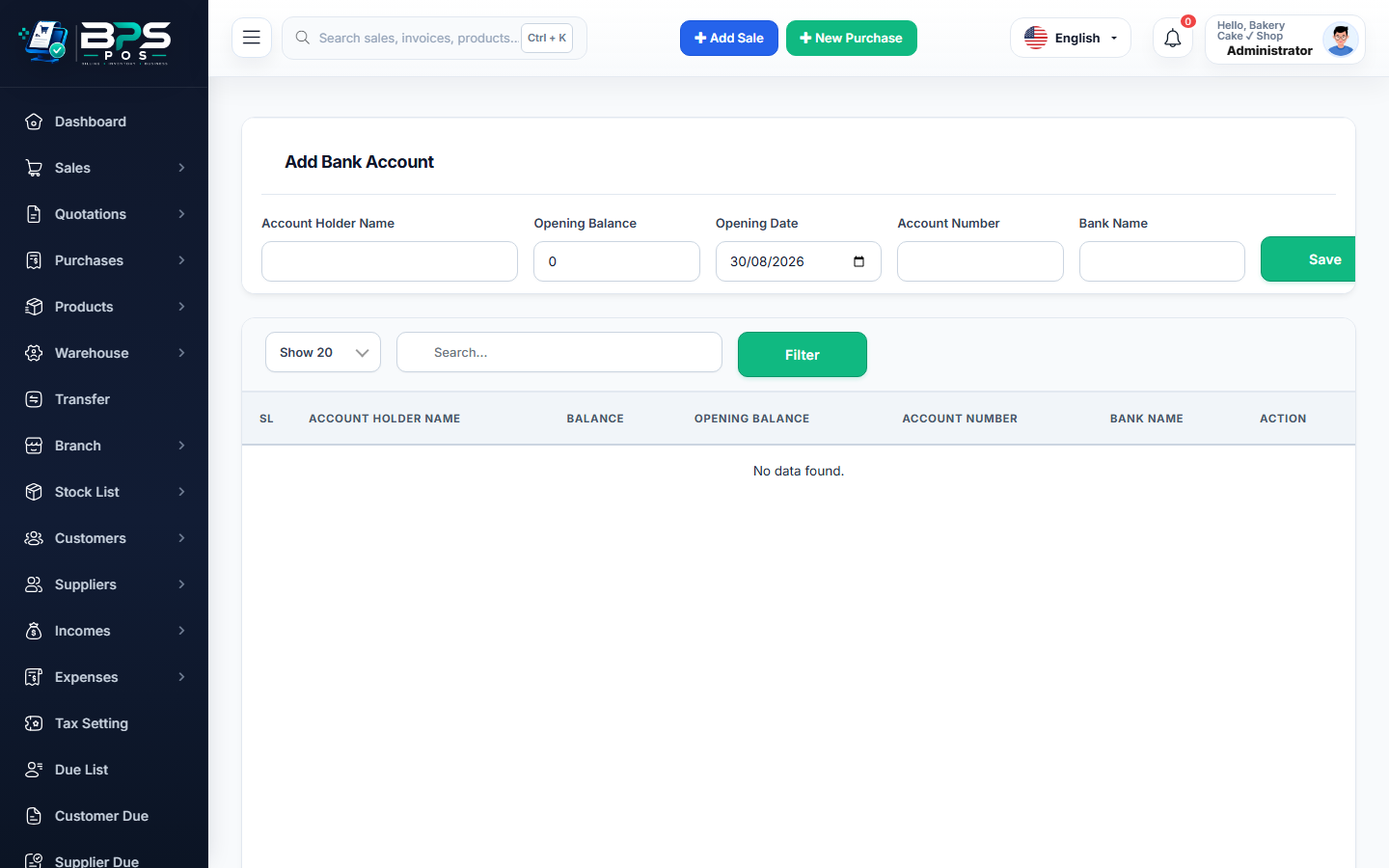
Figure: BPS POS Add and Manage Business Bank Accounts Screen in BPS POS.
Adding a New Business Bank Account
Follow these step-by-step instructions inside your BPS POS dashboard to configure and operate this workflow seamlessly:
- Navigate to Finance → Bank Accounts → Add Bank Account.
- Input Account Details: Enter Bank Name (e.g., Chase, HBL, Meezan, Barclays), Account Title, Account Number, and IBAN/Swift.
- Set Branch & Contact: Add Branch Code, Address, and Relationship Manager contact.
- Set Opening Balance: Input current verified bank statement balance.
- Save Account: The bank becomes instantly available for card settlement, expense payouts, and supplier transfers.
BPS POS Pro Tip & Best Practice
Designate one primary account as the "Default POS Settlement Account" so card sales route to it automatically.
Why This Workflow Matters for Your Business
Lightning-Fast Operations
Eliminate cashier bottlenecks, reduce customer waiting times, and handle peak rush hours effortlessly.
100% Financial Accuracy
Automate tax math, stock deductions, and ledger balances to eliminate human calculation mistakes.
Frequently Asked Questions (FAQs)
Can cashiers see the full bank account balance?
No. Restrict "View Bank Balances" permission to accountants and business owners only.
Ready to Upgrade Your Retail Billing?
Experience lightning-fast billing, automated stock tracking, and multi-branch control with BPS POS.
Explore Pricing Plans →