Auditing sales history is essential for customer service and revenue tracking. BPS POS Sales Register provides a centralized log of all transactions with real-time filters for date, cashier, payment type, and order status.
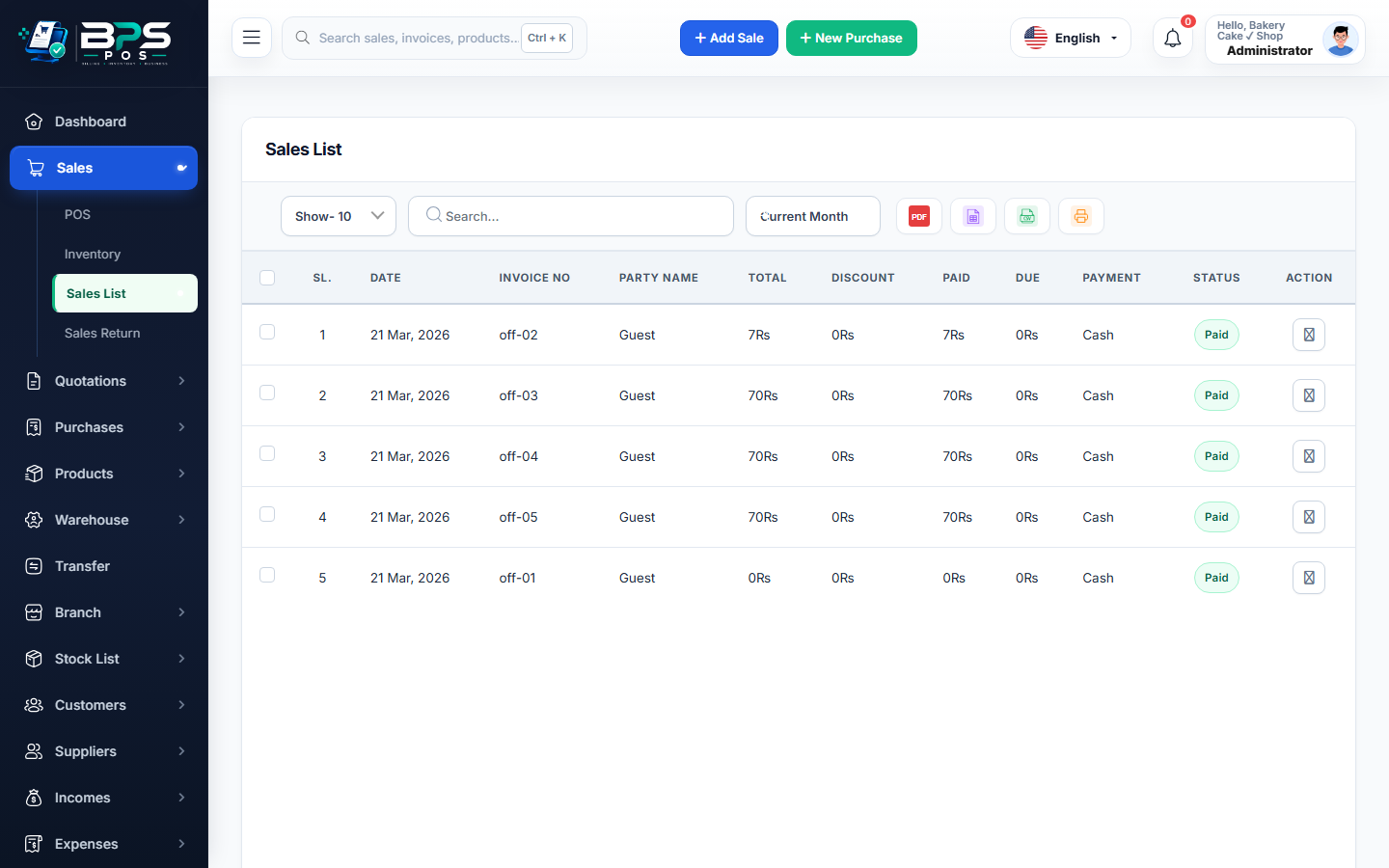
Figure: BPS POS Sales History and Filter Screen in BPS POS.
Searching and Filtering Past Sales
Follow these step-by-step instructions inside your BPS POS dashboard to configure and operate this workflow seamlessly:
- Navigate to Sales → Sales List: View the comprehensive table of all recorded sales.
- Filter by Date Range: Select Today, Yesterday, This Week, This Month, or custom date boundaries.
- Filter by Customer & Cashier: Isolate transactions made by a specific salesperson or billed to a specific client.
- Filter by Payment Status: Toggle between Paid, Partial, and Due bills.
- Quick Search: Type invoice number (e.g., #INV-1082) into the search box for 1-second retrieval.
BPS POS Pro Tip & Best Practice
Click on any invoice row to expand an instant preview modal showing sold line items, tax amount, and applied discount without leaving the page.
Why This Workflow Matters for Your Business
Lightning-Fast Operations
Eliminate cashier bottlenecks, reduce customer waiting times, and handle peak rush hours effortlessly.
100% Financial Accuracy
Automate tax math, stock deductions, and ledger balances to eliminate human calculation mistakes.
Frequently Asked Questions (FAQs)
Can cashiers view sales made by other cashiers?
Only if granted permission in Role Settings; otherwise cashiers see only their own shift sales.
Ready to Upgrade Your Retail Billing?
Experience lightning-fast billing, automated stock tracking, and multi-branch control with BPS POS.
Explore Pricing Plans →